Unlocking YouTube Posts: 10 Ideas to Explore
From a video-sharing platform to a community hub, YouTube has come a long way, especially in the marketing realm. Gone are the days when the platform was about sharing funny cat videos. Today, consumers rely on YouTube to gather useful insights that influence their shopping decisions. On the other hand, brands use this as a platform to get up close with their customers. To give them a sneak peek behind the processes or even share a glimpse into their products and services. YouTube Posts are a crucial format for that.
Keeping up with these evolving applications, the platform has been gaining plenty of new features that enhance the interactions between brands and consumers as well as creators and consumers. Among these, one often-overlooked feature is YouTube Posts, a format that lets creators engage their audience between video uploads using text, images, polls, quizzes, GIFs, and more.
YouTube Posts are hidden gems that offer a goldmine of opportunities for brands and creators looking to leverage the platform to boost engagement. Want to unlock the potential of this feature but don’t know where to start? You’re in the right place. This blog post is your quick-start guide to YouTube Posts. We’re going to discuss some actionable strategies for you to build stronger communities by making the most of this YouTube feature. Without further ado, let’s get started.
- YouTube Posts: An Overview
- Why Features Like YouTube Posts Are Valuable to Brands & Creators
- 10 Winning Ideas To Make the Most of YouTube Posts
- 1. Fuel anticipation by teasing what’s coming next
- 2. To ride the seasonal wave
- 3. Use YouTube Posts for upselling and cross-selling
- 4. Highlight brand partnerships and influencer collaborations
- 5. To put a video in the spotlight
- 6. As an event promotion tool
- 7. Gather feedback from your audience
- 8. Host Q&A sessions
- 9. Share insider information
- 10. Share social proof
- Create Visually Engaging YouTube Posts With KIMP
YouTube Posts: An Overview
YouTube originally limited Posts to channels above a subscriber threshold, but that requirement was removed in 2023. Today, creators with access to Advanced Features can use YouTube Posts. YouTube Posts let you share updates in formats beyond traditional video uploads, including text, images, GIFs, polls, quizzes, music, and video.
Image Posts have also expanded beyond a single image. You can now create carousels with up to 10 images, add music, and reach viewers through the Shorts feed.
YouTube Posts give creators another way to interact with viewers between video uploads, while also giving individual posts a chance to reach people through the Home feed, Subscriptions feed, and, for image posts, the Shorts feed.
YouTube removed the old subscriber threshold for Posts, so access is now tied to YouTube’s feature eligibility requirements, including access to Advanced Features.
When you publish a Post, subscribed viewers may receive a notification depending on their notification settings and YouTube’s notification system. Your Posts may also appear on viewers’ Home and Subscriptions feeds, while image Posts may additionally surface in the Shorts feed. This means you can use YouTube Posts to stay active between video uploads, support your latest content, and keep conversations going with your audience.
YouTube also offers Communities, a dedicated space where creators and viewers can start conversations and share posts with one another. Posts remain the creator-led publishing format, while Communities are designed for more two-way interaction, including viewer-created posts and discussions.
Why Features Like YouTube Posts Are Valuable to Brands & Creators
YouTube remains one of the world’s largest video platforms, giving brands and creators access to a huge global audience. Did you know that YouTube boasts about 2.58 billion monthly active users? This means that a robust YouTube marketing strategy opens up new opportunities to reach such massive audience segments. However, your efforts do not end with reaching such large crowds. What you do to keep them engaged matters even more!
Because data shows that US YouTube users are projected to spend about 51.6 minutes per day on YouTube. Which is a fair sample of the average daily usage of the platform expected in the years to come. All of these indicate that YouTube is a space where users spend a considerable amount of time and not just a few fleeting moments. Therefore, you need to seriously rethink your strategies to grab your audience’s attention and keep them engaged.
Done right, YouTube Posts can be that secret ingredient that keeps audiences interested in your channel and encourages them to keep coming back for more. It can also be a trump card to make them feel like they belong and create a sense of community.
With these foundational facts laid out, let’s now talk about making this happen. About capitalizing on YouTube Posts to create an engaged community.
10 Winning Ideas To Make the Most of YouTube Posts
1. Fuel anticipation by teasing what’s coming next
Have you encountered cliffhangers in TV shows? When the creators tease what’s coming next without giving away too much information, you just cannot wait for the next episode, right? That kind of anticipation you can recreate on your channel using YouTube posts.
In fact, teaser advertising is an intriguing topic in itself and we have a blog post here if you are interested in learning more about it. Did you know that your YouTube Posts Tab can be of great value in utilizing these teasers?
Hence popular YouTubers like Marques Brownlee use YouTube Posts to tease their upcoming content. Here’s an example where he teases an upcoming product launch to build anticipation before the big reveal.

KIMP Tips:
So, what are some ways to use YouTube Posts to tease what’s coming next?
- Add teaser images or videos before the launch of a new product or even before an event.
- Or you can also share short snippets from an upcoming video to evoke excitement before the actual content goes live.
- Do not forget to add questions and statements related to the video or image added.
2. To ride the seasonal wave
There’s an important social media holiday coming up and you do not have an elaborate campaign to showcase in a long-form video on YouTube. So what do you do to engage with your subscribers without this long-form video? Yes, a YouTube Post.
A simple static image or GIF or even a well-worded text post, can be your way to initiate conversations with your subscribers on a popular holiday. This lets you ride the seasonal wave effectively.
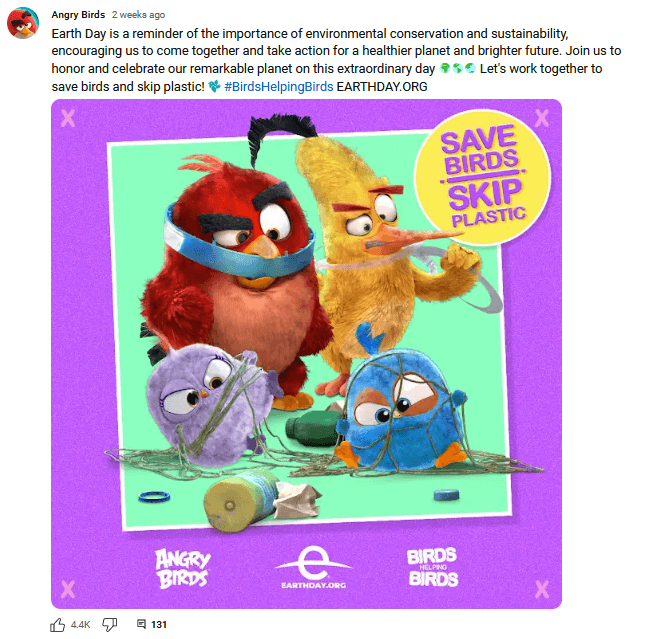
For instance, the Angry Birds channel posted the YouTube Post below, for Earth Day. Besides seasonal content like this one, they regularly add engaging GIFs and intriguing quizzes that keep Angry Birds fans engaged.
KIMP Tips:
- Getting an image to stand out on a video platform can be challenging. Therefore, use visually intriguing images to grab attention – like the one on the Angry Birds channel.
- Going back to that example – another lesson to take away from this is to use big bold text to communicate the message clearly and instantly.
3. Use YouTube Posts for upselling and cross-selling
One creative way to use YouTube Posts is to promote related products, content, and offers while guiding viewers toward the next step in their journey.
For instance, you could use your YouTube Posts to:
- Preview a recent blog post with an engaging image, then direct viewers to the clickable link in your channel profile.
- Give viewers a preview of a new podcast episode using an image or short video Post or audiogram, then direct them to the episode through a clickable YouTube destination.
- Create a short teaser for an upcoming livestream and direct viewers to the livestream or another clickable YouTube destination. For external registration, send viewers to the appropriate link in your channel profile or video description.
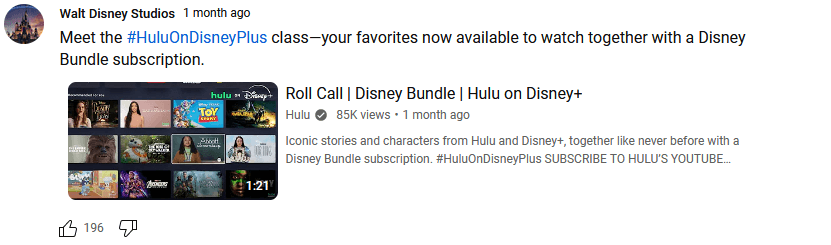
Here’s an example from the Walt Disney Studios’ Posts Tab. The post here promotes their Disney Bundle subscription with a link to a video on Hulu’s YouTube channel.
KIMP Tips:
- Using the above ideas, create YouTube Posts that encourage users to connect with you on other social media platforms.
- When promoting a blog post, use an infographic or engaging visual to preview the value of the article, then direct viewers to the clickable link in your channel profile.
- Add clear CTAs so that users know exactly where to go next!
Need help designing infographics and blog images to promote your blog through YouTube Posts? Get a KIMP Graphics subscription!
4. Highlight brand partnerships and influencer collaborations
Looking for a way to create a buzz for an upcoming brand partnership or influencer collab? YouTube Posts can help! With text, images, carousels, GIFs, video, polls, quizzes, and music available across Posts, you can use them to build anticipation around an upcoming collaboration or extend the life of a recent one.
You can use YouTube Posts to briefly introduce the new brand partner, hint at the nature of the collaboration, and generate excitement with a captivating image or teaser video snippet.
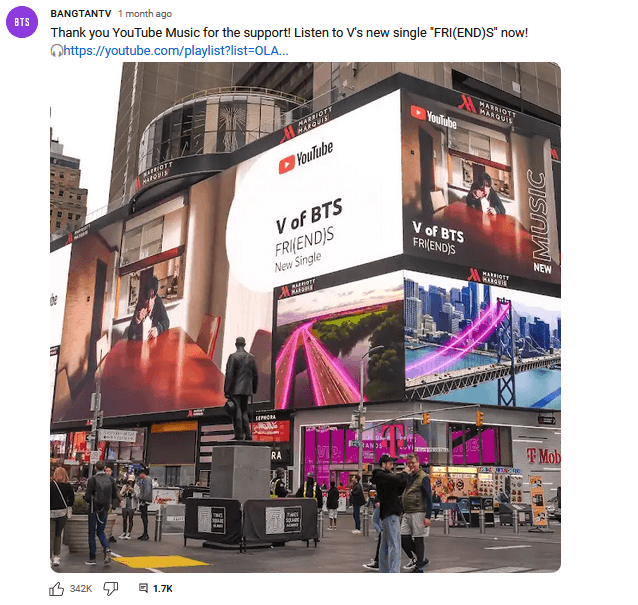
The YouTube Post below, on the official channel of BTS, BANGTANTV, gives a nod to YouTube Music for promoting their new single in their outdoor ads.
KIMP Tips:
To make the most of this idea:
- Offer exclusive glimpses into the filming process of the collaboration video.
- Or share glimpses into the creative brainstorming sessions behind your collaboration.
- Create visually appealing images or GIFs featuring both brands/creators involved in the collaboration.
5. To put a video in the spotlight
One of the most useful ways to use YouTube Posts is to put your videos back in front of your audience and create another entry point into your channel content. This can be a recent video you uploaded or an old video you wish to bump up.
Adding compelling descriptions that give some interesting details about the featured video will encourage more people to check out the video.
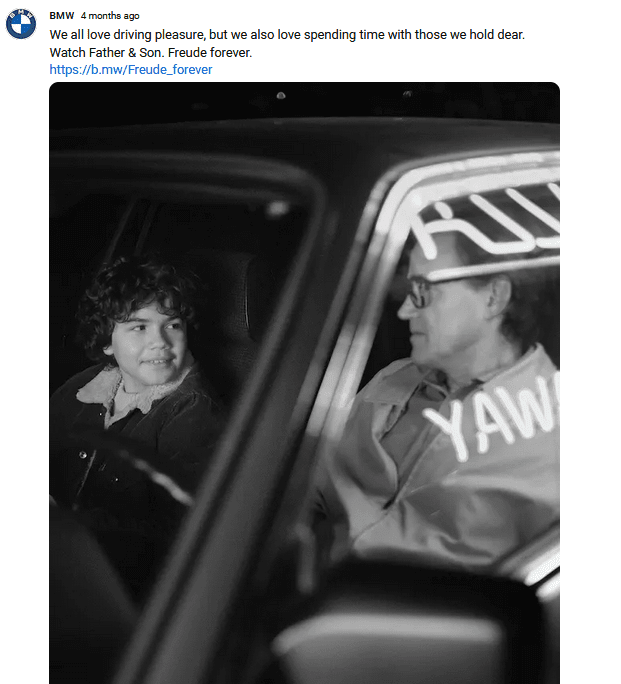
In the YouTube post below, BMW adds a quick hint about their video so that their subscribers would not miss the content.
KIMP Tips:
- While the default video thumbnail is visible when linking back to videos, it’s always a good idea to add a catchy visually immersive image like the one in the above example.
- Use YouTube Posts to capture snapshots of pivotal moments or chapters in the video to evoke intrigue.
6. As an event promotion tool
Do you have a big event coming up? Then there are a lot of details that you might be sharing with your customers – like the venue and timings, details about presenters and so on. Regularly sharing updates keeps your event top-of-mind for potential attendees. This builds excitement and momentum as the event date approaches, ultimately leading to a higher number of registrations and a more engaged audience. The YouTube Post format is perfect for this.
No wonder, even Google uses this approach. Here’s a glimpse of the YouTube Post they shared discussing the Google I/O 2024 event.
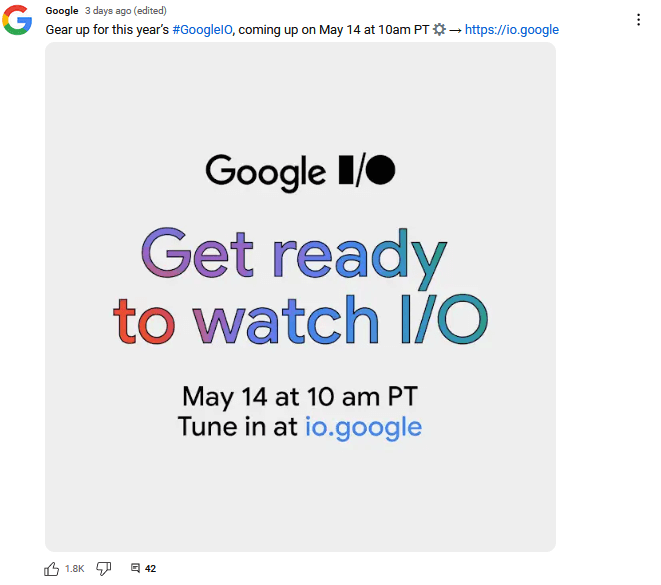
The post includes the official hashtag to help viewers follow the conversation around the event. For external registration, creators should direct viewers to a clickable destination such as a channel profile link or a relevant video description, since external URLs in Posts aren’t clickable. Additionally, here Google uses an engaging GIF to ensure that the post attracts attention.
KIMP Tips:
- To keep the excitement levels high, include event posters to establish the event branding and some infographics that capture the essential details in a shareable format.
- Stay consistent with the visual theme incorporated into all of these visuals created for an event.
7. Gather feedback from your audience
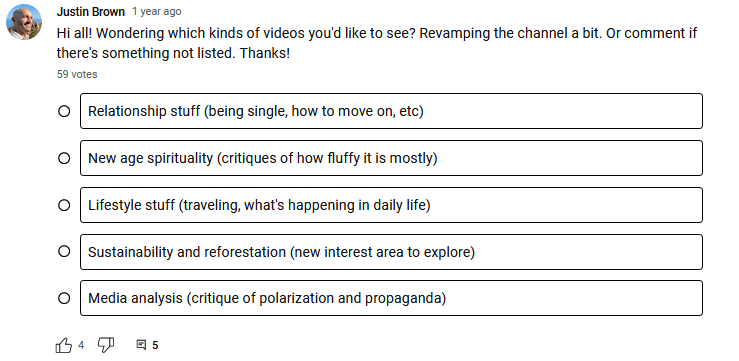
The best use of YouTube Posts will be to build a strong community. Polls in YouTube Posts make this especially useful for gathering audience feedback. You can use polls to gather customer feedback – to understand what they expect from your channel or even to gather ideas for your content strategy.
In the YouTube Post below, YouTuber Justin Brown uses the poll option to gather the opinions of his subscribers about the type of videos they like to see more. This is one way to tailor content to the interests of your audience.
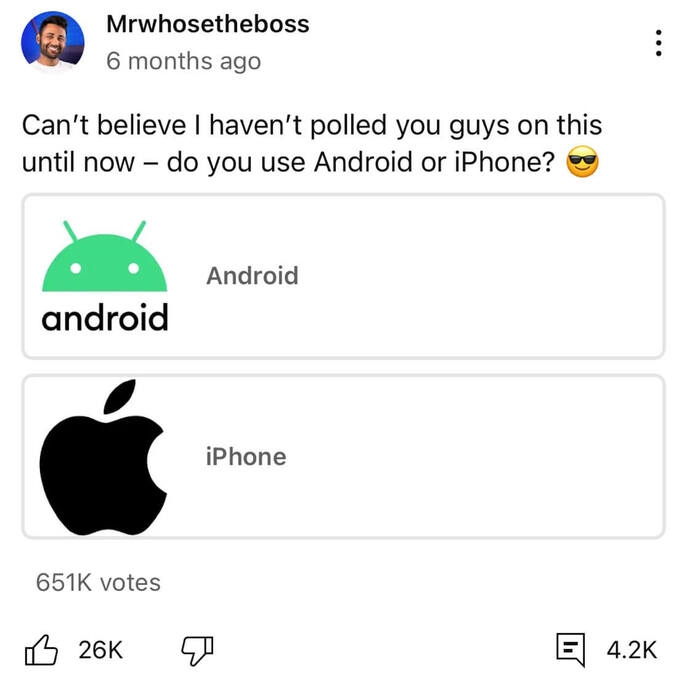
Another is to use polls to understand your audience demographics better. YouTuber Mrwhosetheboss shares content about the latest gadgets. Therefore, his poll in the YouTube Post here can help him understand whether his subscribers are mostly Android users or iOS users.
KIMP Tips:
- In addition to posting polls about the topics and content ideas to create in the future and about audience likes and dislikes, you can also post questions to gather feedback about your existing content. This can be useful in understanding what aspects of your videos to improve to maximize engagement.
- Phrase your poll question clearly and ensure the answer choices are concise and easy to understand.
8. Host Q&A sessions
In addition to polls, you can use text or image Posts to collect audience questions and continue the conversation in the comments. You can also turn frequently asked questions into dedicated videos or Shorts. While you might do them in a video format in most cases, if you need a quick and short session, your YouTube Posts might be a great way to do that.
The YouTube Post below is from the YouTube channel of renowned YouTuber PewDiePie. Here, he created a space for his subscribers to ask him questions.
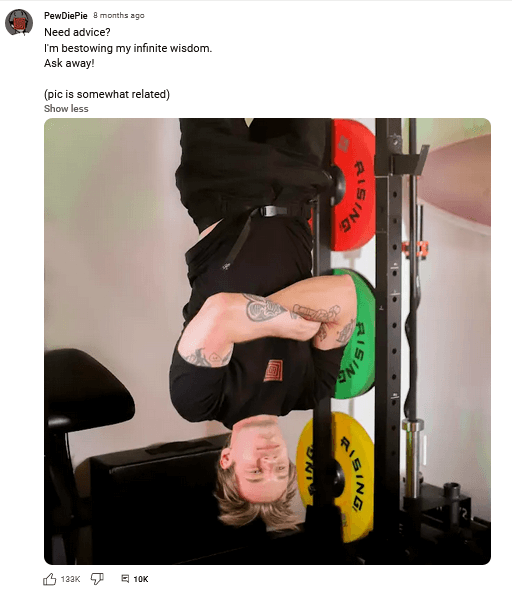
Similarly, you can create a YouTube Post to gather questions from customers and then answer them in the comments or even create dedicated videos to address commonly asked questions. By doing this, you are keeping the conversation two-way while also gathering content ideas for your channel!
KIMP Tips:
- Make the purpose of the Q&A immediately clear with a strong headline, simple visual, or direct question that tells viewers exactly what you want them to answer. So use a catchy visual that highlights that this is a post for users to ask their questions.
- Include details about the Q&A session – like the theme or any specific product or service that users can talk about. This helps streamline the conversations and make it easier to address the queries that come your way.
9. Share insider information
Using YouTube Posts to give viewers behind-the-scenes glimpsesprobab is a good way to foster a community spirit and boost loyalty. It’s a great way to convert subscribers to fans and give them a reason to stay subscribed to your channel.
For instance, the YouTube Post here from Netflix appeals to the fans of the popular Netflix show, “You”. The post builds anticipation among fans waiting for updates about the next season of their favorite show.

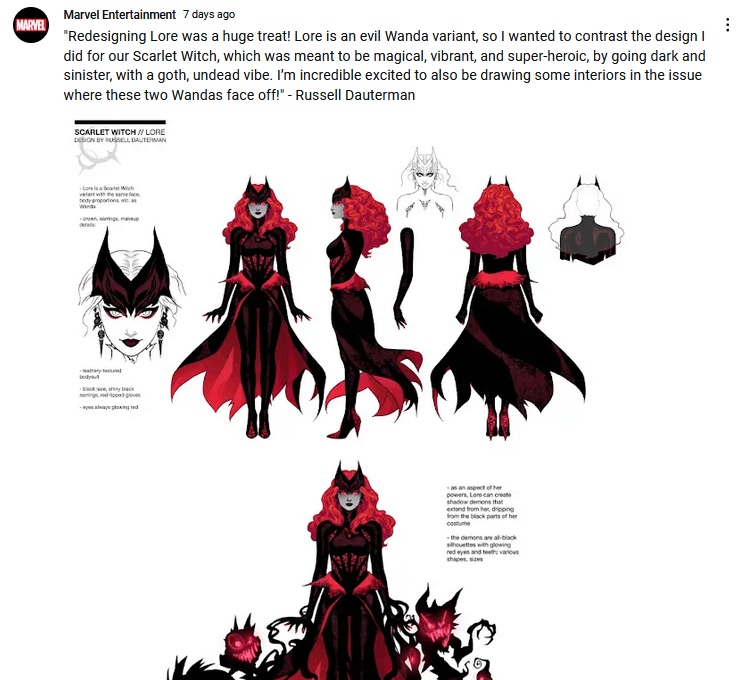
Another great example is from the Marvel Entertainment channel on YouTube. The post here talks about some background information about the design of the costume for a popular Marvel character. These are the kinds of details that excite fans.
KIMP Tips:
To experiment with this idea on your YouTube channel:
- Share bloopers from your recent videos.
- Or some behind-the-scenes content that shows the amount of dedication that went into your creative process.
10. Share social proof
Social proof is another useful way to make your Posts more engaging and reinforce the value of your content or brand. These could be details about any recent awards or accolades won by your brand or social proof in other forms like a recent certification.
These could be in the form of positive feedback from the audience, recent testimonials from major clients, case studies, or even glimpses of a recent achievement that enhances your brand’s credibility.
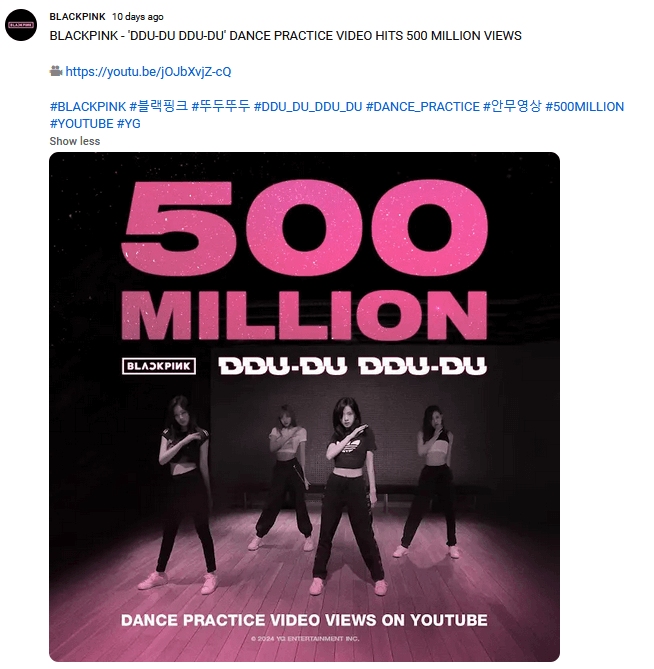
The YouTube Post here from the popular YouTube channel BLACKPINK is about a big view milestone of one of their videos. Most of their Posts focus on how well their videos perform therefore showing their consistent success rate. Moreover, posts like this one evoke the curiosity of users driving them to the featured content.
KIMP Tips:
- Craft cohesive on-brand templates to share user reviews and testimonials on your Posts Tab. This ensures that these posts stand out from the rest of the content you share.
- Use big bold text to highlight key details about the achievements featured in these posts. Notice how the above example uses bold fonts to shine the spotlight on the key detail here “500 million”.
Create Visually Engaging YouTube Posts With KIMP
That brings us to the close of today’s exploration of YouTube Posts. From driving traffic to the desired destinations to increasing engagement, Posts can help take your YouTube channel to the next level.
However, what if you don’t have the time or resources to constantly create captivating visuals for your YouTube Posts? This is where the KIMP team comes in. With a KIMP subscription, you gain access to a dedicated design team that can create stunning custom graphics for your brand for various print and traditional channels including YouTube.
So, what are you waiting for? Register now for a free 7-day trial!