Canva AI 2.0: What’s New and What You Should Try First
TL;DR
What new features did Canva introduce at Canva Create 2026? What is Canva AI 2.0? Time to talk about the next wave of AI updates coming to the platform.
The days of Canva, “a design platform with AI tools” are officially over. Welcome to the new era of Canva, an “AI platform with design tools”. At Canva Create 2026, Canva introduced a host of exciting updates. Among them, the one that’s creating the most buzz is the launch of Canva AI 2.0.
According to Canva, Canva AI 2.0 was built to “save countless hours” and “transform your work”. If you are wondering what the buzz is all about and if you are curious about the new features that come with this update, you are in the right place.
What is Canva AI 2.0?
Canva AI 2.0 is built on what the company calls the Canva Design Model, a creative operating system introduced last year. This foundation model, according to Canva, is the world’s first built specifically to understand the structure, hierarchy, and complexity of real-world design.
Unlike general-purpose language models that can describe or draft text, the Canva Design Model generates outputs that are fully layered, editable, and structured for design.
With the introduction of this AI revamp, the platform moves from being simply “template-based” to an “agent” platform. The refresh brings changes to all the major layers of the product – from the interface to the features to how these features function in the foreground and what happens in the background.
It brings major transformation to the way the platform converses with you and remembers your preferences, thus personalizing the overall experience for all users.
Who can access Canva AI 2.0?
The platform updates are currently available in research preview and a more stable, better-optimized version will be released soon. Canva shared a secret password during the keynote and the updated platform was opened to the first one million users who activated it. This included access to both free and paid users for a limited period.
The Architecture of Canva AI 2.0
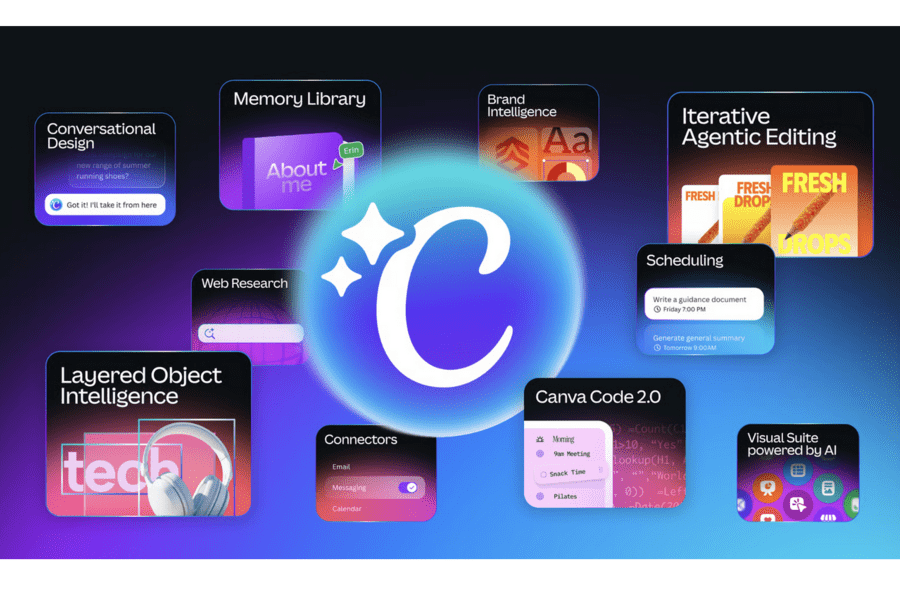
To streamline activities and simplify the process, Canva has introduced four architectural capabilities:
- Conversational design – no more scrambling for tools and switching between chatbots. Describe what you need in plain language and receive a fully editable layout in response.
- Agentic orchestration – the AI plans the work, selects the right Canva tools, and executes a sequence of steps without you choosing them one by one
- Layered object intelligence – outputs are individual, editable objects rather than flat, locked images
- Memory Library – persistent memory that stores your preferences, brand parameters, and design history across sessions so that your results are more personalized.
But these are not the only changes. Canva AI 2.0 also brings in six new intelligent workflows: Connectors, Scheduling, Web Research, Brand Intelligence, Sheets AI, and Canva Code 2.0.
Feature Breakdown: What You Should Know Before Getting Started
Connectors
The modern marketing workflow involves a staggering amount of context transfer. From brainstorming notes on platforms like Notion to meeting recaps from Zoom and design briefs that are discussed in chat platforms like Slack and feedback discussions in email, data for creative workflows are scattered. Canva aims to streamline them with the introduction of Connectors.
What are Connectors? Connectors in Canva plug Canva AI directly into the tools and workflows your team already uses. Connect Slack, Gmail, Google Drive, Google Calendar, Notion, Zoom, HubSpot, Microsoft, Atlassian, and Linear, and Canva AI can draw on your conversations, content, and context to create exactly what you need.
This is Canva’s answer to what Microsoft Copilot does inside the Microsoft 365 ecosystem pulling context from emails, calendar entries, and documents to generate useful content. Even tools like Anthropic’s Claude have Connectors that allow integration of various tools and workflows.
Is it really practical? Yes, with a caveat. The value of Connectors is directly proportional to how well your team’s information is actually distributed in the connected tools. Teams that integrate these tools at various stages benefit from the feature while those with disorganized structures might have to address the foundation first to really make the most of Connectors when using Canva in their design workflow.
Scheduling
Teams often need designs created in batches. This includes designs for various platforms and campaigns. Aiming at reducing the production time and ensuring the timely availability of designs, Canva AI 2.0 introduces the Scheduling option.
What is the scheduling option in Canva? It helps Canva run in the background. It turns your idea into a formatted, on-brand, ready-to-publish asset across multiple formats and platforms.
Users can set repeatable background tasks, which can be drafted for review before posting. For example, the new Canva can crawl the web for breaking tech news overnight, determine what’s trending, then create and even schedule social media posts on its own.
Social scheduling tools like Buffer, Hootsuite, and Later handle the scheduling and publishing side of this workflow. But they do not generate the content. What Canva AI 2.0 combines is content generation plus scheduling in a single system, with brand consistency maintained automatically.
How useful is the Scheduling feature? For content teams, this can be a plus. The critical point is that Canva’s Scheduling delivers outputs as drafts for human review before publishing, not as autonomous live posts. That is the correct architecture for any AI-assisted content system. Never allow fully automated publishing without a review step.
Web Research
Creating content that is topically relevant requires knowing what is currently happening in your industry. Most designers and content creators need to spend hours researching to put together their brief and then start designing. Canva AI 2.0 has introduced a feature that aims to reduce this friction and reduce the time and effort overall.
Web Research allows the platform to perform research across multiple sources. Additionally, it can be scheduled to run in the background and added to designs. Combined with Scheduling, this means you can configure Canva AI to monitor specific topics, industries, or keywords overnight and use fresh information to inform the designs it drafts for your review queue in the morning.
Is it really practical? For teams publishing trend-reactive content like news and industry updates, this is a useful add-on. In short, it can be a plus when you prioritize time-sensitive content.
Brand Intelligence
The lack of brand consistency is one problem several users observe when using AI tools to generate designs. Canva aims to address that with Brand Intelligence.
Brand Intelligence handles the automatic application of brand elements like logos, color palettes, typography, tone guidelines, image style parameters across all AI-generated outputs. This comes in handy for marketing agencies handling marketing assets for multiple brands as well as for marketing teams tackling designs for their brand and its sub-brands.
Notably, Adobe allows users to save and instantly apply Brands in Adobe Express. Even the recently introduced Claude Design allows users to save and apply brand elements for consistency.
Canva Code 2.0
AI tools like Claude and ChatGPT are increasingly capable of generating functional, well-structured HTML for landing pages, interactive widgets, data display components. The problem is what happens after generation. The output lives in a code block.
Hence the design side of it does not come into the picture there. If you want to change the color, adjust the layout, or change an image, you either edit the code directly (which most non-developers find challenging) or you might find the need to regenerate the whole thing.
For the large majority of people who need interactive web content but are not developers, AI-generated HTML has been functionally inaccessible as an editable artifact. So, Canva Code 2.0 has been introduced to tackle the gap.
With the update, users can describe an interactive idea in plain language, and the AI will build a responsive web experience. Notably, these files remain fully editable within Canva’s visual drag-and-drop editor. So, you do not have to write or rewrite the code for aesthetic tweaks.
Additionally, building on the previously available coding capabilities on the platform, Canva ins introducing the option to import HTML. Claude Artifacts can be brought directly into Canva and edited like any other design. These edits can be applied without regenerating code with each change. You can collect data with Canva Forms into Sheets, or publish as an interactive website with a custom domain, all without leaving Canva.
How useful is Canva Code 2.0? For marketers and founders who need functional landing pages and client-facing mockups quickly, this can be a good feature.
Sheets AI
Capturing data in a visually immersive manner is something several teams struggle with and the latest updates in Sheets AI on Canva are designed to tackle that.
Sheets AI lets users describe the structured document they need in natural language and then Canva builds a populated spreadsheet. Combined with Connectors, the sheet can draw from live data in HubSpot or Google Drive rather than generating placeholder structures you still have to fill manually.
The sheet itself is inside Canva’s environment, which means a data visualization built from it can move directly into a presentation or social asset without format conversion.
This is closely similar to the features that Microsoft Copilot brings to Excel and Google Gemini brings to Sheets. Typically, Sheets AI is not for power spreadsheet users. It is built for the much larger population of people who need a functional, formatted structured document as a starting point for designed outputs. Remember that the value is in the continuity between the data and the design, not in the sophistication of the spreadsheet itself.
Canva AI 2.0: FAQs
No. Image generation is only one layer. The system is built around structured design outputs, meaning results are editable objects (text, layout, elements), not flattened images. That’s what makes it usable in real workflows rather than just for concept visuals.
Midjourney and Firefly primarily generate visuals. Canva AI 2.0 focuses on production-ready design systems. Canva, with its features like Scheduling and its coding capabilities, aims to build on creative tasks.
It sits between both. Simple tasks like formatting, resizing, or repurposing content can be automated. But higher-level decisions like messaging, layout direction, and brand judgment still require human input. Think of it as execution automation, not creative replacement.
What This Means in the Creative Space
The launch of Canva AI 2.0 should not be viewed as a single event or a standalone platform’s advancement but rather the ripple it creates in the creative space. The news about Figma’s stock dropping by 28% in March 2026, Adobe actively acquiring Semrush and progressing toward a more streamlined AI-driven marketing suite and now Canva taking on a new role as an AI platform with design capabilities all mean that design is changing.
Traditional design workflows don’t work anymore. Design teams need to keep up. Marketing teams need to keep up.
The change is happening behind how creative work happens. For decades, creative production meant a predictable pattern – research, planning, design and publishing all happening in different places. And now creative platforms like Canva are making strong progress toward streamlining those tasks.
So, you do not need just any creative team. You need a creative team that is AI-ready. A team well-equipped with the latest AI tools and technology so that your design workflow does not feel outdated.
Looking for an AI-ready design team that can handle your design across Canva, Adobe and other design platforms? Sign up for a KIMP subscription.