Design Templates: The Secret to Streamlined Design
Great designs do not always have to start from a blank canvas. Some of them start from design templates.
You need visuals everywhere – from billboards to social media posts, flyers to website design, visuals dominate the marketing realm. Therefore, the pressure is real. Constantly churning out new designs for your brand is no easy feat. That’s why you need design templates!

Whether you are a marketer juggling endless campaigns or an entrepreneur wearing multiple hats, branded design templates can save you a lot of time and effort in creating visuals.
So today we’re discussing templates – the different types, benefits, and some tips in creating your own assortment for various applications.
Design Templates: What Are They & Why Do You Need Them?
So, what are design templates? Think of these as your solution to the fear of starting on a blank canvas. Whether you are working on marketing graphics or internal communication materials, it helps to have a pre-made visual layout. When there is a rough framework, customizing it becomes so much simpler. That’s precisely what design templates are all about!
They ensure that there is a clear structure in your design, and hence, all it takes is to swap out the key elements. Therefore, this is fast and efficient!
Let’s now talk about a few key benefits of using branded design templates in your design workflow:
1. Speed up production & save time
The first and foremost benefit of design templates is that they help save time and speed up your production. You do not have to reinvent the wheel with every social media ad or digital banner ad when you already have a template in place. All it takes is switching around the design elements to place the core message in sight!
Imagine you need to launch a flash sale campaign, complete with social media graphics, an email banner, and a quick landing page update. If you’re building each of these visual assets from scratch, you’re not just designing; you’re also making countless micro-decisions: “What’s the right font size for this headline?” “Which shade of blue works best here?” “Does this image fit the aspect ratio?” Each of these tiny decisions, multiplied across several assets, adds up to significant time, and time, as we know, is money.
For instance, here are two different ads promoting two different things from Target. The one thing that remains the same is the template!
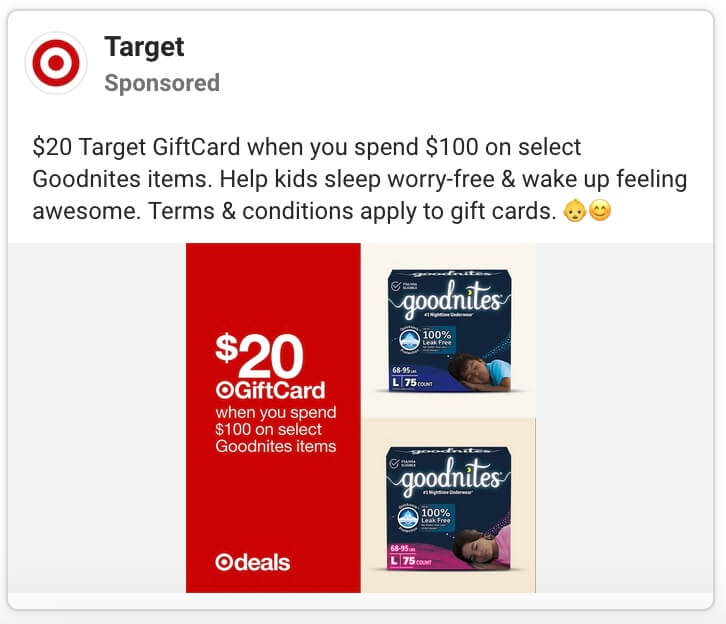
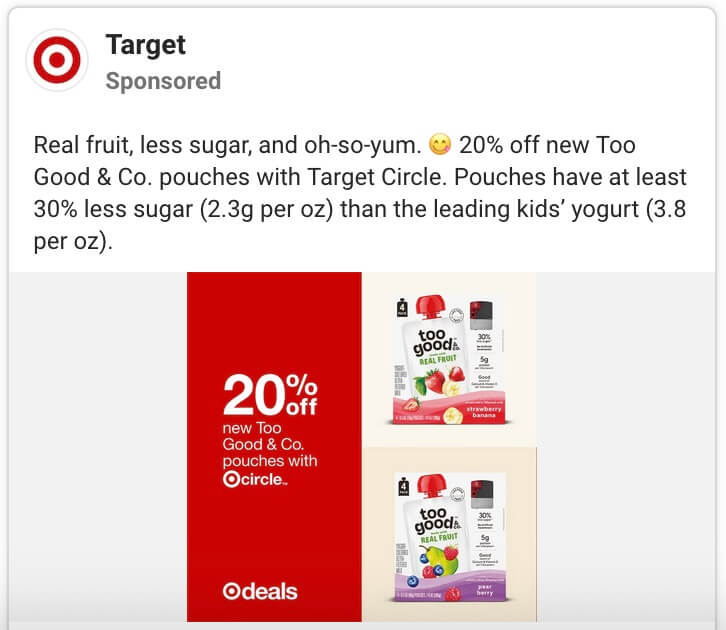
As you can see, when you have design templates, with the foundational design work already ready, all that’s left is plugging in fresh ad copy and images. This means that your team can spend more time on strategies and storytelling than creating designs from scratch.
2. Boost professionalism & credibility
First impressions are everything in marketing. Therefore, you need polished visuals to stand out. What’s one way to always produce high-quality visuals without having to put everything together from scratch? Design templates, of course!
After all, the visual quality of your designs influences how your target audience perceives your brand. A visually unpolished or inconsistent presentation of your brand can inadvertently signal a lack of attention to detail, organization, or even overall quality within your operation.
Therefore, use design templates to increase the perceived value of your brand through stunning visuals every single time.
All this is because templates ensure that you do not make amateurish design mistakes like choosing the wrong fonts or going with awkward spacing in your design.
3. Maintain visually consistent, on-brand designs
Consistency is crucial to strong branding, and it’s what makes your brand recognizable. Design templates ensure that your visual assets look consistent.
Design templates establish the basics like the fonts, placement of text and images, icons, and logo placement. But why does consistency matter? Because it builds trust and recognition. A 2024 study by Lucidpress found that consistent branding can lead to a nearly 23% boost in your revenue by making your business instantly recognizable. And design templates help you achieve this visual consistency across various touchpoints.
For instance, take a look at the two posts below, from Spotify. Can you instantly tell they are both from the same series? Yes, they are to spotlight the “New Music Friday” series, where Spotify recommends the latest international music.
From the placement of text to the background design and the overall layout, there is striking consistency across the slides in both posts. If you wish to achieve this level of consistency across your posts, especially on social media, branded design templates are what you need.
4. Slash design costs
Let’s face it, high-quality designs can be expensive, especially when you have to create new assets for every campaign, channel, and customer touchpoint. Hiring an in-house design team or constantly outsourcing individual projects to agencies can quickly become a major drain on your budget. This is precisely where design templates offer a strategic, cost-effective solution without compromising on quality.
Therefore, design templates let you cut down the cost on a portion of your design workflow while you allot your budget to some more crucial designs that call for absolute creativity and designing from a blank canvas.
Here’s a snapshot of the fees charged by some designers on Fiverr for social media graphics.
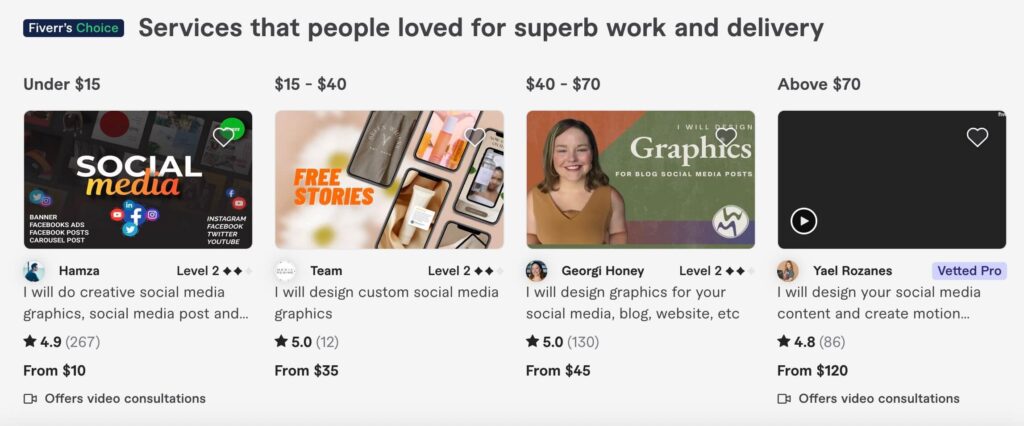
Some of them charge for a small set of designs like 3-5 posts. While some charge on a per design or per post basis. Imagine having to vet a designer and spend that much money on each design.
If you need a mix of branded design templates and custom graphics and wish that the same design team could do both, get KIMP!
5. Scale content creation without sacrificing quality
As your business grows, so do your design requirements. You find yourself in a position to come up with more social posts, more blog graphics, more email campaigns, more ad creatives, without letting the quality slip. So you have to increase the volume without diluting your brand or making costly marketing errors. Design templates help achieve that.
For example, when you have a long-running campaign and wish to actively use social media and other digital channels to promote the campaign and maintain its momentum, creating a few templates for each platform gives you a strong foundation. In the weeks or months that follow, you can simply customize these templates and share them on the relevant channels to keep the conversations alive.
One of the notable details here is that increasing the content volume sometimes leads to last-minute errors and missed details. Like positioning your logo wrong, leaving out your tagline, or missing out on the proper use of your brand colors. In all such cases, design templates help reduce the chance of errors. With templates, you know that the crucial elements are all there. Elements that tell viewers instantly that it is an ad from your brand.
This means less time spent on corrections and reviews. Therefore, a more efficient quality assurance process, even at scale.
With the benefits explored, let’s now talk about the use cases for design templates.
Key Use Cases: How Design Templates Transform Your Marketing Assets
Now the next big question is – where do you need design templates? Given their many benefits, using them in the right places is what counts. Let’s talk about a few practical applications of design templates.
Social media graphics
Social media thrives on speed and consistency! So, having templates helps. What kinds of social media templates do you need?
- Post templates
- Story templates
- Video templates
- Thumbnail templates
- Templates for series posts
- Templates for carousels
- Frames for UGC (user-generated content) posts
- Highlight covers
- Social media cover image templates that can be customized seasonally or when there are announcements to spotlight
To nail your social media templates, identify the core formats or post types you share on your page. These could be product-related discussions, weekly insightful discussions, informative tips, quotes, testimonials, and more. Knowing the types of posts you share makes it easier to understand where templates come in handy.
The ads here are from Walmart’s Facebook ad collection. The first one is a consumer-focused ad, whereas the second is for Walmart Business, the company’s business-focused solutions.

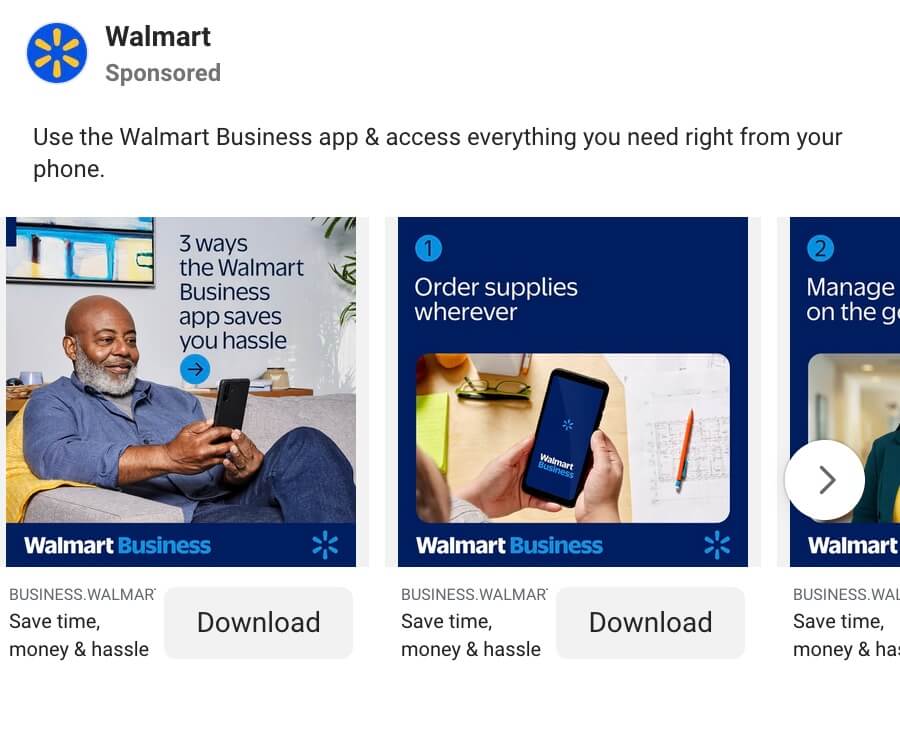
The distinct styles make it easier to differentiate the applications and the audiences the ads are meant for.
Email design templates
Emails are information-intensive. While images do help split the content into snackable sections, there is still a lot of information to process. One way to make it easier for your audience is to ensure that you maintain consistency across your emails. Where can they find the CTA? Where will the offer details be? Templates can help define these.
A few types of templates you can create for email marketing are:
- Newsletter templates
- Follow-up email templates
- Cart-abandonment email templates
- Welcome email templates
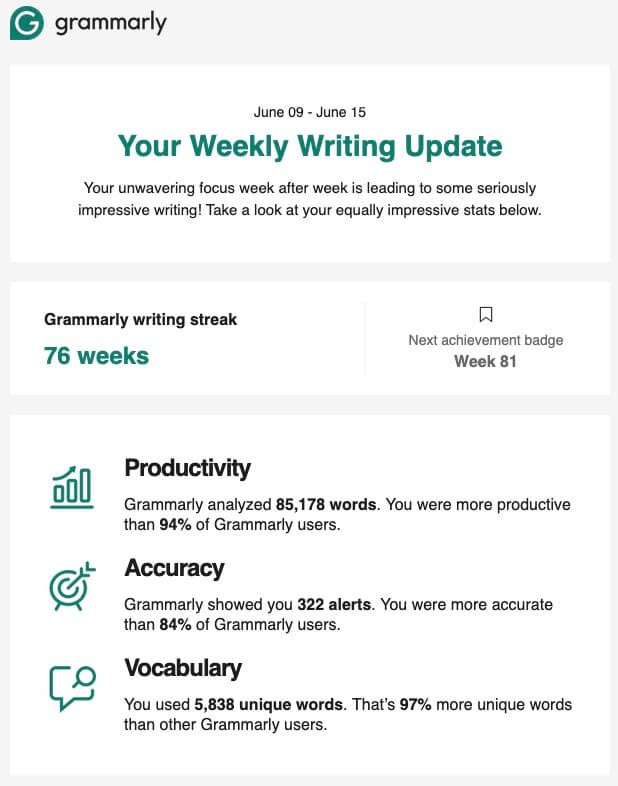
Take Grammarly’s emails, for instance. Its “Weekly Writing Update” emails are visually consistent with the same layout repeated every time. What does this mean? The familiarity it builds makes it easier for users to find the information they are looking for.
Presentations & pitch decks
Presentations and pitch decks are as dense in information as emails. One additional consideration here is that putting together an engaging and visually appealing presentation can be quite tedious. That’s why design templates help.
Whether you are pitching your ideas to investors or sharing some presentations as a part of internal communication, your slides should be easy to navigate through, and having standard templates simplifies this. After all, manually designing every single slide every single time can be time-consuming and can lead to a lot of visual inconsistencies as well. So to avoid this, templates can be in the form of whole presentations or specific slides used in a variety of applications.
So, what are a few presentation templates to keep handy?
- Investor pitch deck templates
- Sales presentation templates
- Webinar slides
- Title slides
- Case study/testimonial slides
Ad templates
Digital advertising is a vast field with diverse channels and formats to explore. You need to test, optimize, and scale fast. Each channel requires specific visual dimensions, compelling headlines, and clear calls-to-action, all while staying perfectly on brand.
The constant need to come up with fresh visuals for all these platforms and for all your campaigns feels cumbersome, and that’s where design templates save the day. They ensure rapid campaign launch and testing while also preserving visual consistency across channels and formats.
A few useful ad design templates to have are:
- Display ad templates in standard banner sizes
- Social media ad templates for Feed and Story ads
- Masthead ad templates for YouTube
Pro-Tips for Mastering Design Templates
With the groundwork set, now it’s time to start implementing your ideas. So, how do you design templates that truly serve your marketing goals? Most importantly, how do you design templates that are flexible and resonant with your brand and message in the long term?
- A clear brand foundation should lead the way – start by locking in your brand elements. Your logo, brand colors, brand fonts, use of mascots, specific icons or symbols that resonate with your brand – a combination of some of these will aptly capture the essence of your brand.
- Ensure that you design for adaptability – while aesthetics are important, what’s more important is to ensure that they are built for change. Use grids, repeatable blocks, and smart spacing strategies so your design can flex across use cases. For emails, this could be in the form of different blocks for hero images and CTAs.
- Document all applicable how’s and why’s – adding a brief usage guide to your template makes the design even more practical. This could be a short note explaining what to change and what not to change in the layout or the elements.
- Prioritize clarity and simplicity – you do not want a cluttered and complicated template that’s difficult to understand and customize. After all, the whole purpose of design templates is to increase efficiency by saving time and reducing the complexity of design workflows.
- Placeholders to the rescue – finally, when you have a template ready, use placeholders instead of blank spaces. This makes the template even easier to work with.
Design Captivating Branded Design Templates With KIMP
You’ve seen how design templates can revolutionize your marketing workflow – from cutting costs and time to ensuring consistency and professionalism and scaling content easily. But creating high-quality, customizable templates, the ultimate frameworks for several of your future designs, is a pivotal task. And working with designers with the right strategies and skills makes this easier.
But what if these designers could also create custom graphics from scratch or even assist in customizing your templates when you’re running short on time? A design team that supports unlimited designs is one that can adapt to your evolving design needs at every stage. The flexibility of an in-house design team minus the overheads – that’s what an unlimited design subscription like KIMP offers.
Ready to design templates that streamline your design workflows? Sign up for a KIMP subscription.
Register now for a free 7-day trial!